
The Earning Games login page allows registered users to access their accounts, check available games, view rewards, manage account details, and continue their previous activity. You can log in using the mobile number, email address, or username connected to your account.
Make sure you enter the correct details to avoid login errors. Never share your password, verification code, or account information with anyone.
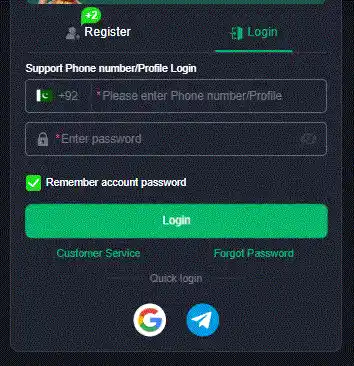
How to Log In to Earning Games
Follow these simple steps to access your account:
- Open the Earning Games app on your Android phone.
- Tap the Login button on the welcome screen.
- Enter your registered mobile number, email, or username.
- Type your account password carefully.
- Complete the verification step if required.
- Tap Login to open your account.
After a successful login, you can access your profile, games, rewards, transaction history, and account settings.
Download the App Before Login
You must install the latest version of the app before accessing your account. Visit the Earning Games download page to get the available version and follow the installation instructions.
After installation, open the app and use your registered details to log in.
Earning Games Login Requirements
Before signing in, make sure you have:
- An active Earning Games account
- Your registered mobile number, email, or username
- The correct account password
- A stable internet connection
- The latest version of the app
- Access to your registered phone number for verification
Using outdated app versions may cause login errors, loading problems, or missing features.
Login with Mobile Number
Many users create their accounts with a Pakistani mobile number. To log in with your phone number:
- Select the mobile number login option.
- Enter your number with the correct country code.
- Type your password.
- Enter the OTP code if requested.
- Tap the login button.
Always use the same mobile number that you entered during registration.
Login with Email or Username
Some accounts may support email or username login. Enter your registered details exactly as you used them while creating the account.
Check for typing mistakes, unnecessary spaces, and incorrect capital letters before submitting your information.
How to Create a New Account
New users must register before using the login page. Follow these steps:
- Open the Earning Games app.
- Tap Register or Create Account.
- Enter your mobile number or email address.
- Create a strong password.
- Enter the verification code.
- Complete the required profile details.
- Submit the registration form.
After registration, save your login details in a secure place.
Forgot Your Earning Games Password?
You can reset your password if you cannot remember it.
- Open the login screen.
- Tap Forgot Password.
- Enter your registered phone number or email.
- Request a verification code.
- Enter the code you receive.
- Create a new password.
- Return to the login page and sign in again.
Choose a password that is difficult for other people to guess. Avoid using your name, phone number, or simple combinations such as 123456.
OTP Code Not Received
If you do not receive your OTP verification code, try these solutions:
- Check that your mobile number is correct.
- Wait for one or two minutes.
- Make sure your SIM has network coverage.
- Restart your phone.
- Tap the resend code option once.
- Check your SMS inbox and blocked messages.
- Contact official support if the problem continues.
Do not request the OTP repeatedly because too many attempts may temporarily block verification.
Common Earning Games Login Problems
Incorrect Mobile Number or Password
Check your login information carefully. Make sure there are no typing mistakes or extra spaces.
Account Not Found
This error may appear when you enter a number, email, or username that is not connected to an account. Confirm your registered details or create a new account.
App Not Opening
Restart your phone, clear unnecessary background apps, and make sure you have enough free storage.
Login Button Not Working
Check your internet connection and update the app. You can also close and reopen the application.
Account Temporarily Locked
Several incorrect login attempts may temporarily restrict access. Wait before trying again or use the password recovery option.
Server or Network Error
The platform may be undergoing maintenance, or your internet connection may be unstable. Switch between Wi-Fi and mobile data and try again.
Outdated App Version
An older version may no longer connect properly. Install the latest available version from a trusted source.
How to Keep Your Account Secure
Follow these basic account safety practices:
- Create a strong and unique password.
- Never share your OTP or password.
- Avoid logging in on unknown devices.
- Log out after using a shared phone.
- Do not click suspicious links.
- Enable two-step verification if available.
- Use only the official app or website.
- Keep your phone and app updated.
- Never give remote access to your device.
- Contact support if you notice unusual activity.
Official support should never ask for your full password or private verification code.
How to Log Out of Earning Games
Logging out is recommended when you use a shared or public device.
- Open your account profile.
- Go to Settings.
- Find the Logout option.
- Tap it and confirm.
Your account will remain registered, and you can log in again using your original details.
Can I Use One Account on Multiple Devices?
Some platforms allow users to access the same account on more than one device. However, frequent device changes or simultaneous login attempts may trigger additional verification.
For better account security, use your account mainly on your personal phone and log out from devices you no longer use.
Earning Games Login Safety Notice
Earning Games should be used responsibly. Some platforms may include paid competitions, optional purchases, rewards, or promotional features. These rewards are not guaranteed.
Before adding money or joining a paid activity:
- Read the platform rules.
- Review deposit and withdrawal conditions.
- Check the minimum withdrawal limit.
- Use only supported payment methods.
- Set a spending limit.
- Never use borrowed money.
- Stop playing if it affects your finances or daily life.
Users should also check applicable local laws and platform age requirements before participating in any money-related activity.
Conclusion
The Earning Games login process is simple when you use the correct registered details and the latest app version. Enter your mobile number, email, or username, provide your password, and complete any required verification.
If you face a login problem, check your internet connection, reset your password, update the app, or contact official support. Always protect your account information and never share your OTP or password with anyone.
Frequently Asked Questions
Open the app, tap Login, enter your registered mobile number, email, or username, type your password, and complete verification if requested.
No. You must create an account before using the login page.
Tap Forgot Password, enter your registered details, verify your identity, and create a new password.
Common reasons include an incorrect password, weak internet, an outdated app, server maintenance, or a temporarily restricted account.
This depends on the platform. Check your profile settings or contact official customer support.
Saving your password on your personal secured device may be convenient, but you should never save it on a shared or public device.
Network problems, incorrect phone details, SMS filtering, or high server traffic may delay the code.
You may be able to recover it using your registered mobile number, email address, or official account recovery process.